Ubuntu 8.10 Intrepid Ibex 64-bit LiveCD session on a Pangolin Performance panp4i
- Ubuntu loaded at 1024x768, stretching the display across my 1280x800 laptop screen.
- System -> Preferences -> Screen resolution
- Was set to mirrored:

- Note that the monitor indicators in the upper left are of different sizes.
- (Note: "Mirror Screen" is cut off)
- Green screen-box (non-Unknown) is set to 1024x768
- (Note: Clicking "help" does nothing)
- Uncheck "mirror"
- Now the "Unknown" screen-box is all that is visible, and is on top. I can drag it down to reveal "Laptop 15 inch"
- Set "Unknown" resolution to Off
- Its screen-box turns black, and gets wider
- Select "Laptop 15 inch" and choose 1280x800:

- The screen-box gets wider, but not as wide as Unknown
- Apply
- Screen goes black, then comes up at proper resolution
- GNOME fills the entire screen
- However, the right 56 pixels and bottom 32 pixels are random junk:

- [Ctrl]+[Alt]+[F1], [Ctrl]+[Alt]+[F7] does not clear the junk
- Clicking and dragging *works* in the junk zone
- Windows maximize to the non-junk area
- The screen resolution dialog now shows "Unknown" next to "Laptop 15 inch", instead of below. (Whatever.)
- There is now only one monitor indicator in the upper left
- In a bid to clear the junk, I set the rotation to Left, and Apply
- It works:
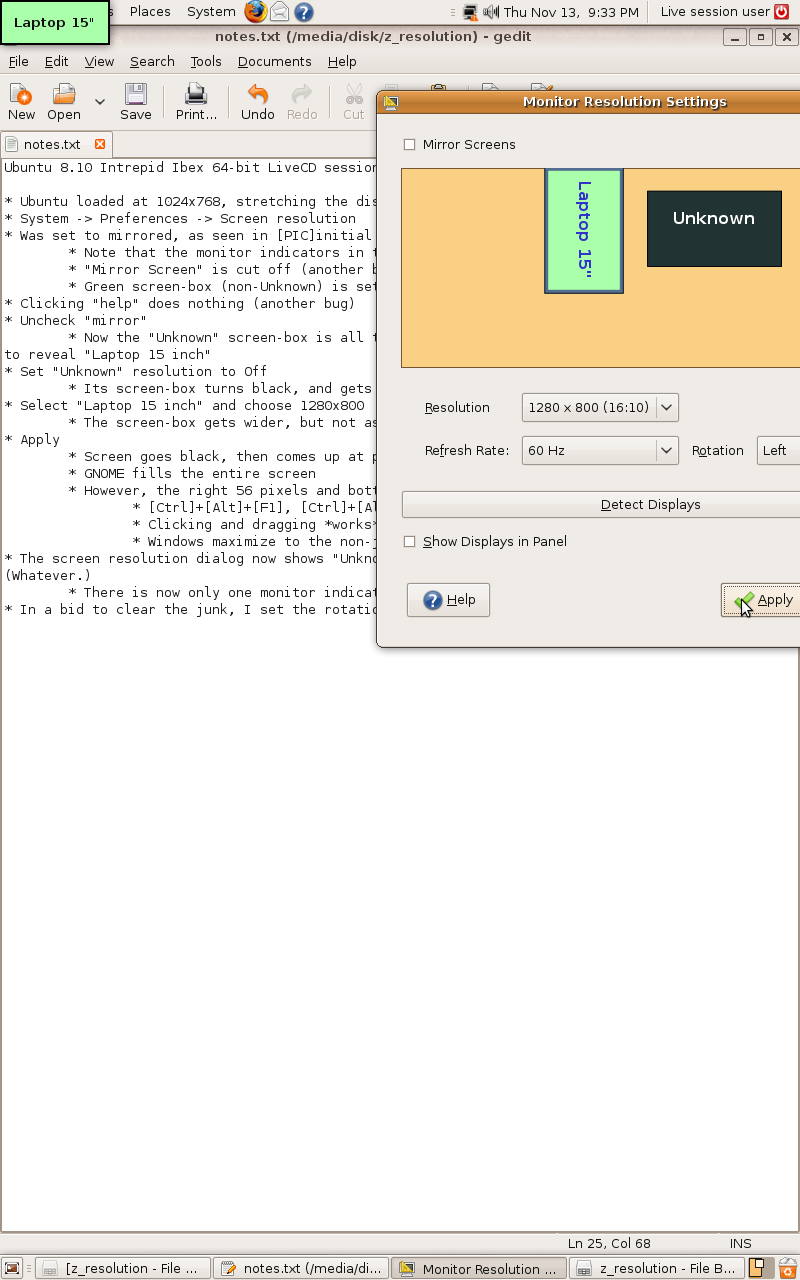
- I set the rotation to Normal, and apply
- I'm kicked all the way back to the GDM login screen, starting with the black X cursor
- User "ubuntu" automatically logs in after 10 seconds
- Screen settings are now perfect!
- Just to screw around, I try to set the screen resolution back down to 1024x768
- Kicked back to the login screen
- Resolution is now 1024x768
- Set it back to 1280x800
- Not kicked back, but screen has the junk-bars again.
- I assume I can fix this again by doing rotation.